

Direct answer
"Service Recommended" means macOS has determined that the MacBook battery holds less charge than it did when new or is not functioning normally. It is not, by itself, an emergency shutdown message. Apple says the Mac can continue to be used before the battery is checked. The decision to replace it depends on real symptoms such as short runtime, unexpected shutdowns, charging problems or physical swelling. Check Battery Health, maximum capacity where available, cycle count and recent usage. If the case, trackpad or keyboard is lifting, stop using and charging the MacBook and arrange inspection because a swollen battery is a separate safety issue.
Quick answer
| What you see | What it means | Best next step |
|---|---|---|
| Service Recommended with acceptable runtime | Capacity has declined or macOS detected abnormal battery behaviour | Plan an inspection and monitor symptoms |
| Runtime is much shorter than your real workload requires | Usable capacity is affecting daily use | Compare battery condition and replacement options |
| Mac shuts down unexpectedly on battery | Battery, power or another system issue may be involved | Back up and diagnose rather than relying on the label alone |
| Trackpad, keyboard or bottom case is lifting | Possible battery swelling | Stop charging and arrange prompt inspection |
| Mac will not charge | Adapter, cable, port, charging circuit or battery can be involved | Test the full charging path |
| Message appeared after a macOS change | Health calculation or settings may have updated | Confirm current Battery Health and symptoms |
What Apple means by Service Recommended
Apple's current battery condition guide describes two main states. "Normal" means the battery is functioning normally. "Service Recommended" means its ability to hold a charge is lower than when it was new, or the battery may not be functioning normally.
Apple also states that you can continue to use the battery before it is checked without harming the Mac. That statement applies to the status message itself. It does not override visible swelling, heat, odour, liquid damage or a deformed case.
The message is therefore a service decision prompt, not a complete diagnosis. Some users notice only reduced runtime. Others see shutdowns, charging instability or performance changes. The relevant question is how the battery behaves in the exact MacBook and workload.
Check Battery Health and recent usage
In current macOS versions, open Apple menu > System Settings > Battery and review Battery Health. The available details vary by Mac and macOS version. You may see condition and maximum capacity, which compares current capacity with the battery when it was new.

Also review the Last 24 Hours or Last 10 Days graphs where available. Apple's Battery settings guide explains that these views can show battery level, charging and screen-on usage. They help distinguish a battery that drains during heavy work from one that loses charge while nearly idle.
Record:
- the battery condition and maximum capacity shown;
- the time the Mac lasts during your normal workload;
- whether shutdowns happen at a repeatable percentage;
- whether the Mac charges consistently with the usual adapter;
- whether the symptom occurs on every USB-C or MagSafe connection;
- whether the case, trackpad or keyboard has changed shape.
Do not use one screenshot from an unknown battery utility as the entire diagnosis. macOS information, physical inspection and actual behaviour belong together.
What cycle count can and cannot tell you
A charge cycle is accumulated use equal to 100 percent of the battery's capacity, not necessarily one connection to the charger. Two 50 percent discharges can add up to one cycle.
Apple publishes model-specific cycle-count limits and instructions for finding the count in System Information. The limit is not a timer that makes the battery fail on the next cycle. A battery below the listed count can still have a fault, and a battery near its limit may still be useful for a particular owner.
Use cycle count as context. Condition, maximum capacity, shutdown behaviour and physical state matter more to the immediate decision.
Reduced capacity is different from a charging fault
A worn battery may charge normally but run for less time. A charging fault can prevent the battery from receiving power even when its cells are still usable. The adapter, cable, power source, USB-C or MagSafe port, charging controller and mainboard power path can all affect the result.
If the MacBook works only when connected, do not automatically order a battery. If it will not charge through one port but works through another compatible port, the port or its path deserves attention. If no port works, test with a correct, known-good adapter and cable before moving to internal parts.
The MacBook and laptop repair service can evaluate the battery and the charging path together. When a port or board circuit is damaged, device port repair or board-level diagnosis may be relevant, but only after testing identifies that scope.
Physical swelling changes the answer
Battery swelling is not the same as ordinary loss of runtime. Stop using and charging the MacBook if you notice:
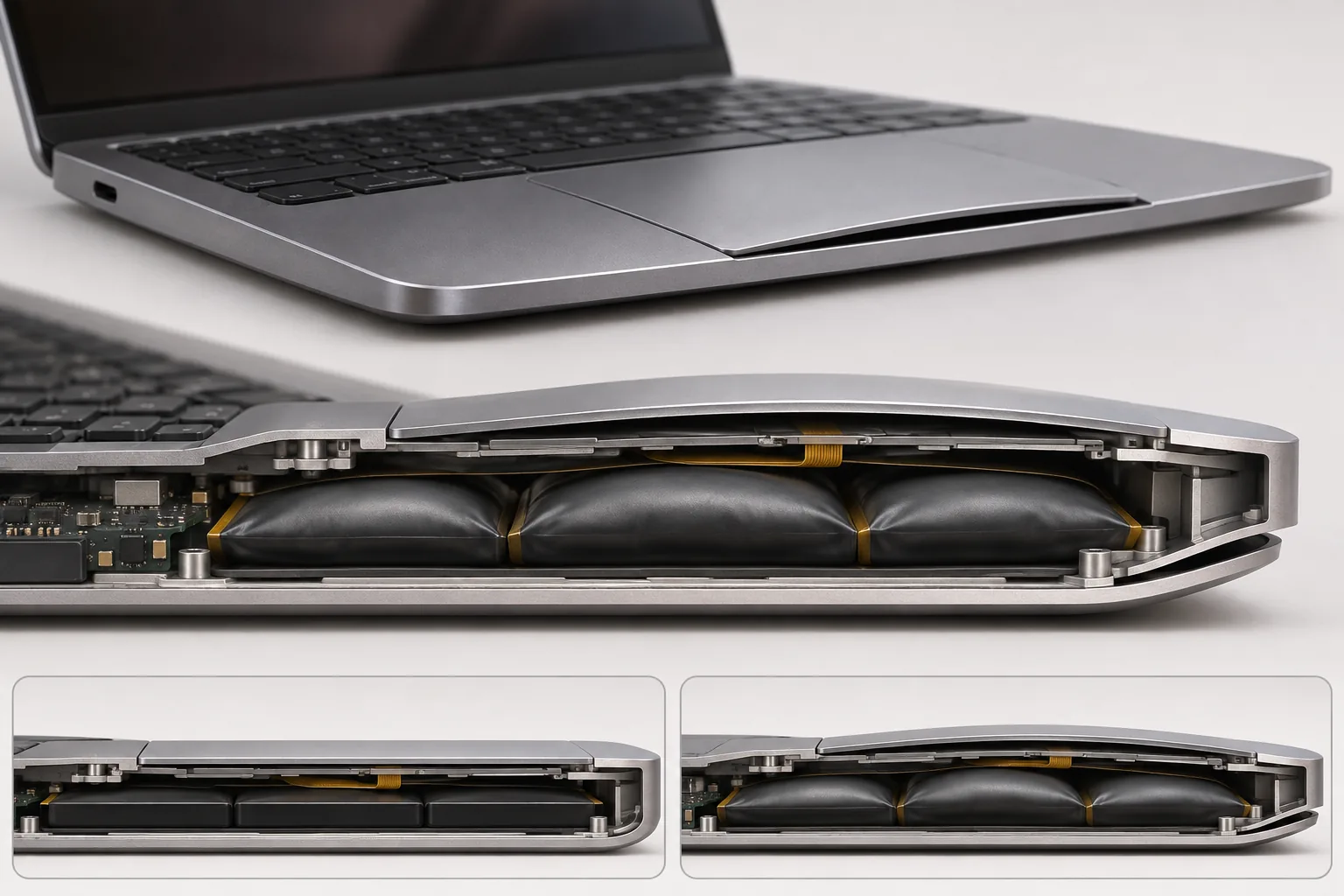
- a trackpad that is lifting, hard to click or no longer sits flat;
- a keyboard or palm rest that bulges;
- a bottom cover that opens a gap;
- the laptop rocking on a flat table;
- unusual heat, chemical odour, hissing or smoke.
Do not press the case flat, puncture the battery or keep the charger connected to finish a backup. If the Mac is stable and not showing an active safety sign, a current backup is sensible. If it is hot, hissing, smoking or rapidly deforming, move away from it and follow local emergency guidance instead of transporting it normally.
Montréal winter and battery observations
A MacBook carried outdoors in winter can be far colder than the room where it will be used. Apple recommends operating Mac laptops in an ambient temperature of 10 to 35 C in its temperature guidance. Let a cold laptop return gradually to a normal indoor temperature before evaluating runtime or charging behaviour.
Avoid placing it directly against a heater and watch for condensation when moving between cold and warm environments. One cold commute should not be used to estimate permanent capacity. Compare the battery again under normal indoor conditions.
Cold-weather context does not explain swelling, repeated shutdowns indoors or a persistent Service Recommended state. Those still deserve normal battery and power diagnosis.
Battery health management is not a repair failure
Modern macOS versions may manage charging to reduce chemical ageing. Depending on the model and settings, the Mac may delay charging past a certain level or limit maximum charge based on usage patterns. Apple's battery health management explanation says the feature monitors temperature history and charging patterns and may reduce maximum charge to slow ageing.
This means "not at 100 percent yet" is not automatically a defective battery. Review Optimized Battery Charging or charge-limit settings before diagnosing a charging fault. Do not disable long-term battery management simply to make the number reach 100 percent every day.
What you can do before service
- Make a current backup.
- Record Battery Health, maximum capacity and cycle count.
- Note runtime during one representative task.
- Inspect the MacBook on a flat surface for case deformation.
- Check the adapter, cable and port for visible damage or debris without inserting tools.
- Install supported macOS updates if the Mac is stable.
- Test the normal charger from a direct wall outlet, not through an unknown hub.
Do not run the battery to zero repeatedly as a "calibration" ritual unless Apple provides that instruction for the exact model. Modern MacBook batteries do not require routine deep discharge.
Replace the battery or replace the MacBook?
Battery replacement is often reasonable when the MacBook is otherwise dependable, supports the software you need and the battery is the clear limitation. The correct repair scope depends on model construction and whether swelling has damaged the trackpad, top case or bottom cover.
Replacement of the whole computer deserves consideration when the battery issue is combined with major display, board, storage or chassis problems, or when the Mac no longer supports required software. Include data migration, accessories and setup in the comparison.
Do not compare a battery price with a new Mac in isolation. Compare the expected condition of the complete computer after repair.
Prepare the MacBook for diagnosis
Bring the normal power adapter and cable. Record whether the problem occurs on battery, on power or both. If the Mac shuts down at a particular percentage, note the percentage and the application in use. A screenshot of Battery Health and the cycle count is useful, but do not delay service to produce it if the case is swelling.
Back up your files and remove unnecessary accessories. You do not need to erase the Mac just to obtain an initial battery and charging assessment.
Final answer
Service Recommended means the battery has lost capacity or is not functioning normally. It does not, on its own, mean the MacBook must be shut down immediately. Use actual runtime, shutdown behaviour, charge consistency, cycle count and physical condition to decide what happens next.
Visible swelling, case deformation, unusual heat or odour changes the priority and requires prompt inspection. Otherwise, back up the Mac, document its behaviour and compare a targeted battery repair with the condition of the whole computer.
Check the MacBook battery in downtown Montréal
Bring the MacBook and its usual charger to Allô Réparation on Google Maps. Mention the runtime you actually receive, any shutdown percentage and whether the chassis has changed shape.